


Enterprise DataSecurity Management: Challenges, Strategies, and How Ugphone Cloud Phone Can Help

In today’s rapidly developing digital economy, enterprise data assets have become the core driving force behind business growth. Customer information, financial records, and operational reports—once leaked or damaged—can cause severe impact on corporate reputation, compliance, and operations.
However, in the face of increasingly diverse and intelligent cyberattacks, traditional data protection measures are no longer sufficient. At this point, companies not only need systematic security strategies but also innovative tools such as *UgPhone Cloud Phone * to enhance flexibility in data management and improve resilience against risks.
1. What is Enterprise Data Security Management?
Definition and Scope of Data Security
Enterprise data security refers to the protection of various types of digital information within an organization, preventing unauthorized access, leakage, tampering, or loss. Data security not only concerns the stable operation of IT systems, but also affects brand reputation, legal compliance, and market competitiveness.
Why is it so important?
- Prevent customer information leaks to avoid brand trust crises
- Ensure business continuity and prevent operational disruptions caused by system crashes or data corruption
- Comply with GDPR, CCPA, and other international regulations to avoid hefty fines and legal risks
- Protect trade secrets to prevent core technologies and strategies from being stolen by competitors
2. Core Challenges in Data Security Management
Increasingly diverse cyberattack methods: ransomware, phishing emails, DDoS attacks, supply chain vulnerabilities, etc. Attack methods evolve constantly, making traditional defense systems insufficient for full coverage.
Weak internal awareness: relying solely on firewalls and antivirus software while neglecting permission management and employee security training—the “soft security” aspects.
Evolving regulations, increasing compliance pressure: global data regulations are becoming stricter, requiring continuous updates to security strategies.
3. Five Best Practices for Enhancing Data Security
- Comprehensive data encryption: implement end-to-end encryption from local storage to cloud transmission.
- Multi-factor authentication: use SMS, email, fingerprint, and other multi-factor verification to improve login security.
- Institutionalized employee security training: conduct regular cybersecurity awareness training.
- Anti-phishing mechanisms: quarterly simulated attack tests and secure coding training for developers.
- Backup strategy: follow the “3-2-1” rule—3 copies, 2 local copies on different media, and 1 offline copy stored remotely.
4. UgPhone: The Key Tool for Enhancing Both Enterprise Data Security and Efficiency
Traditional tools can no longer meet the needs for multi-account management, remote operations, and data isolation. The emergence of*UgPhone Cloud Phone* provides enterprises with a highly efficient, controllable, and flexible secure operating environment.
Four main applications of UgPhone in enterprise data management:
- Account isolation to prevent bans: run multiple accounts in isolated environments to avoid account suspension risks from platform device identification.
- Strong anti-association settings: supports one-click new device, smart IP selection, and device fingerprint masking.
- Batch operations to save manpower: control hundreds of cloud phones simultaneously for batch logins, publishing, and automated tasks.
- No-local-storage data security: store all business data in the cloud to avoid risks from device loss or employee turnover.
Applicable scenarios:
- Multi-account nurturing and ad placement for cross-border e-commerce
- Unified management of overseas social media marketing data
- Remote hosting and testing of gaming projects
- Internal app debugging and terminal deployment
- Departments requiring high-frequency remote operations and encrypted data processing
5. Quick Start Guide to UgPhone Cloud Phone
Step 1: Visit*UgPhone Cloud Phone* to register and download UgPhone

Step 2: Select device configuration and activate instances (activate multiple as needed)
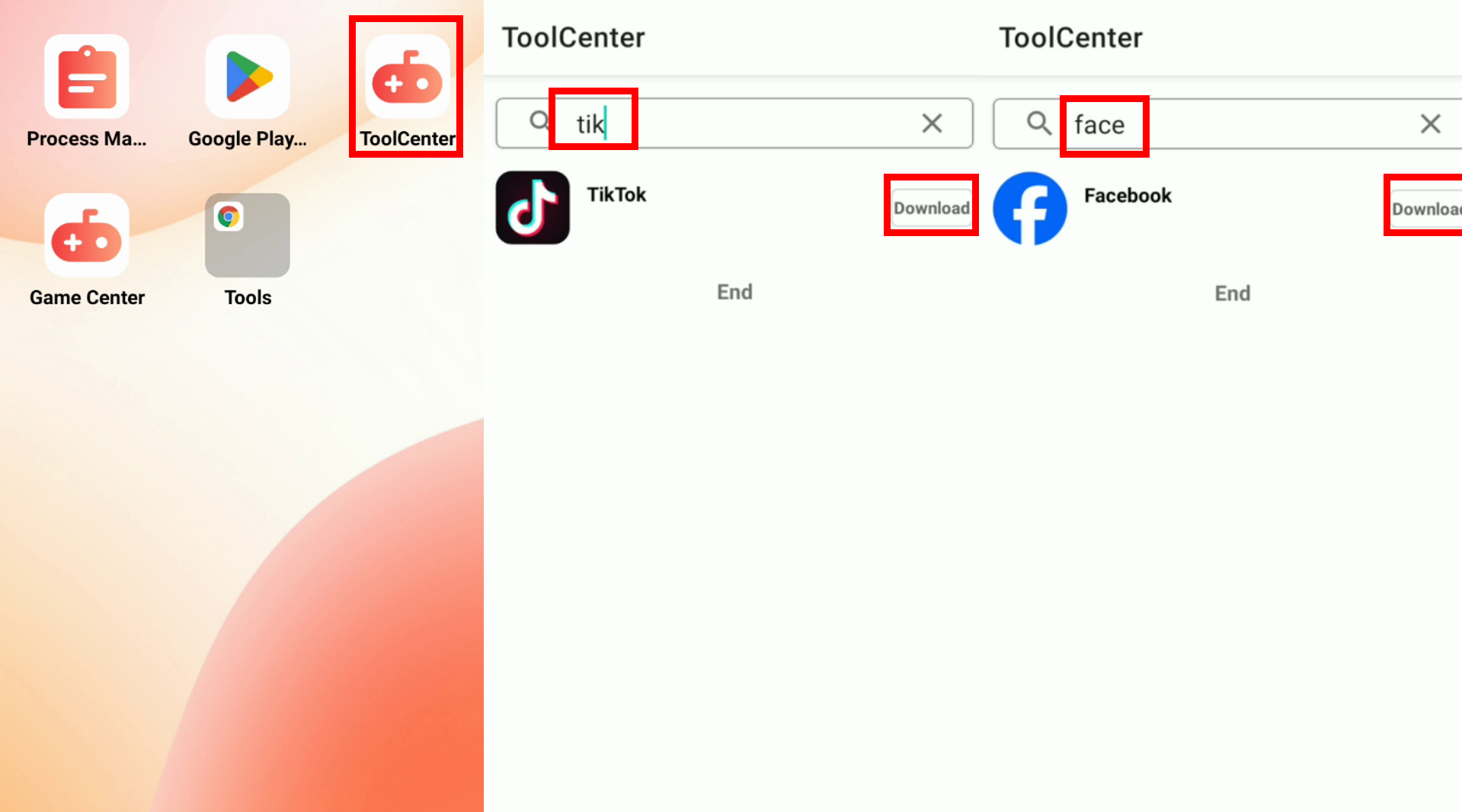
Step 3: Enter the Ugphone cloud phone and install applications
Step 4: Bind automation scripts or use the built-in clicker to execute batch and scheduled tasks
Facing the intensifying threats to data security, enterprises must abandon traditional thinking and adopt intelligent and automated security management models.
With UgPhone Cloud Phone, you can not only improve account management efficiency but also reduce the risk of data leakage—offering comprehensive protection for your enterprise’s digital assets.
Try*UgPhone Cloud Phone* now and experience true intelligent protection.
Tutorial video (includes 30-day GVIP access):









