
Cloud Phone App Management: UgPhone Tutorial, Multi-Account Tool & 24/7 App Running

How can you achieve efficient app management with cloud phones?
In this post, we’ll dive into the key pain points users face, explore the advantages of UgPhone Cloud Phone, and walk through a step-by-step tutorial. With UgPhone, you can run apps 24/7, manage multiple accounts in parallel, and keep your data securely backed up — all while making app management smarter and more efficient.

Why Cloud Phones for App Management?
In today’s mobile-first world, smartphones are central to work, study, and entertainment. But as apps grow in number and complexity, many users struggle with:
- Low efficiency in app management
- Excessive device resource consumption
- Complicated account switching
For those who need multiple accounts or long-term app running, these issues are even more frustrating. Phones overheat, drain battery quickly, and may even crash.
So, is there a smarter solution?
Yes — cloud phones. Powered by cloud technology, they address local device limitations and elevate app management to the next level. Let’s look at the pain points, the benefits of cloud phones, and how*UgPhone*makes it all practical.
1. User Pain Points: The Three Major Struggles of Traditional App Management
1.Tedious multi-account switching
Apps like social media, games, and productivity tools often require multiple accounts. Constantly logging in and out wastes time and increases mistakes.
2.Heavy local resource consumption
Running apps continuously overheats your phone, slows performance, and drains battery. Scenarios like auto-grinding in games, video transcoding, or persistent sessions can overwhelm devices.
3. Inconvenient data safety & backups
If data is lost or the device breaks, recovery is tough. Without regular backups, important accounts and progress can vanish.
These problems not only hurt efficiency but also add unnecessary stress.
2. Cloud Phones: The Ultimate Solution for App Management
A cloud phone is essentially a virtual smartphone running on the cloud. You control it remotely via a client app, enabling continuous app running and smarter management.
With UgPhone, you’ll enjoy:
- 24/7 uninterrupted online sessions
Apps keep running in the cloud whether or not your physical phone is on. - Multi-account parallel running
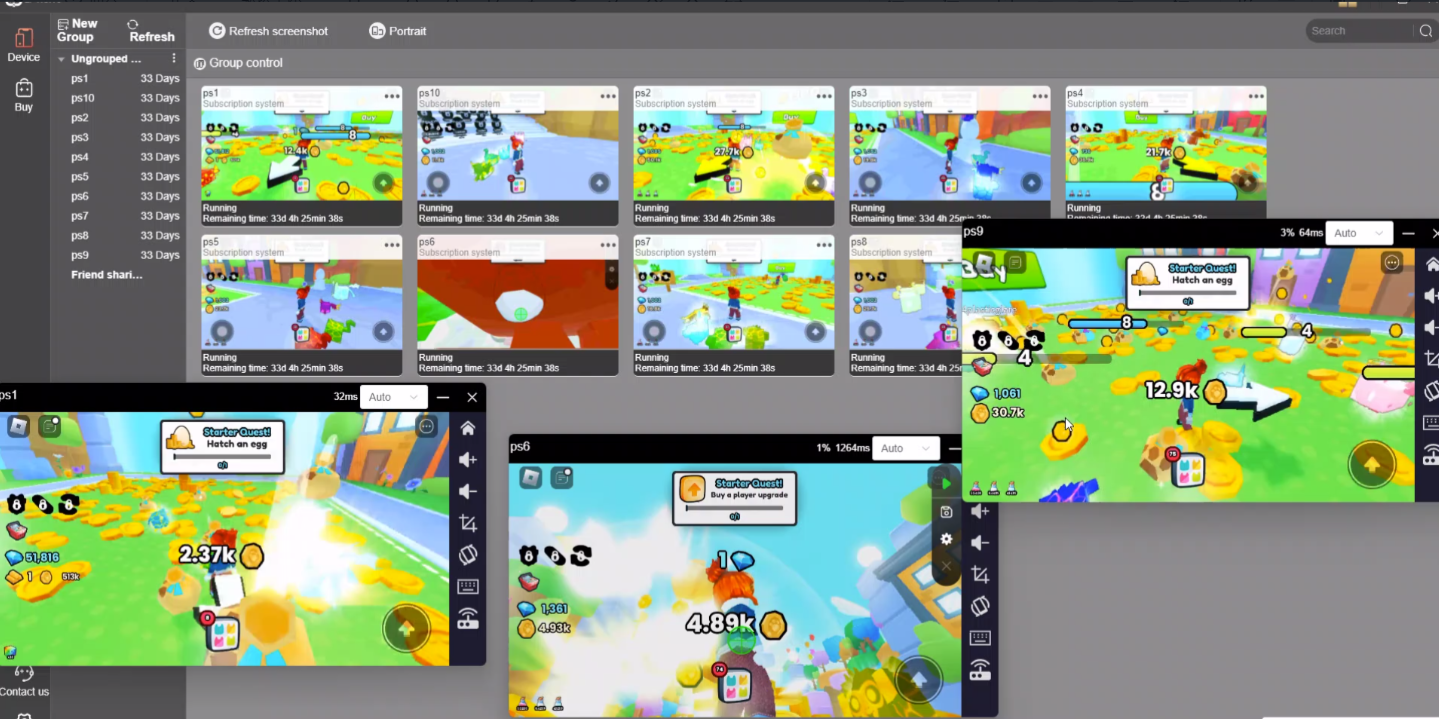
Open multiple cloud instances to manage several accounts at once — no more endless logging in/out.
- Zero local resource consumption
Apps run in the cloud, so your real device’s battery, CPU, and memory stay free. Even low-end phones perform smoothly. - Data safety & easy backups
All app data is stored in the cloud, recoverable anytime. No worries about device damage or accidental deletion. - Cross-platform seamless management
Access your apps from PC, tablet, or phone — all synced and under control.
In short, cloud phones eliminate performance, stability, and safety limits of local devices, taking app management into the smart era.
3. UgPhone: The Smarter Choice for Efficient App Management
As a professional cloud phone platform, UgPhone is optimized for different scenarios:
- For work: Log into multiple accounts simultaneously, keep everything synced without endless switching.
- For gamers: 24/7 cloud grinding, free your hands, never get disconnected.
- For social media managers: Run multiple social apps at once, easily handle multiple accounts.
Whether you’re an individual or a team, UgPhone boosts productivity and efficiency.
UgPhone Tutorial: Get Started in 3 Easy Steps
Step 1: Download & Install
Visit*UgPhone* or your app store, download the client, and sign up.
Step 2: Bind & Log into Apps
Install the apps you need inside your cloud phone and bind your accounts. Multiple accounts can run simultaneously, no need for repetitive logins.
Step 3: Manage & Optimize
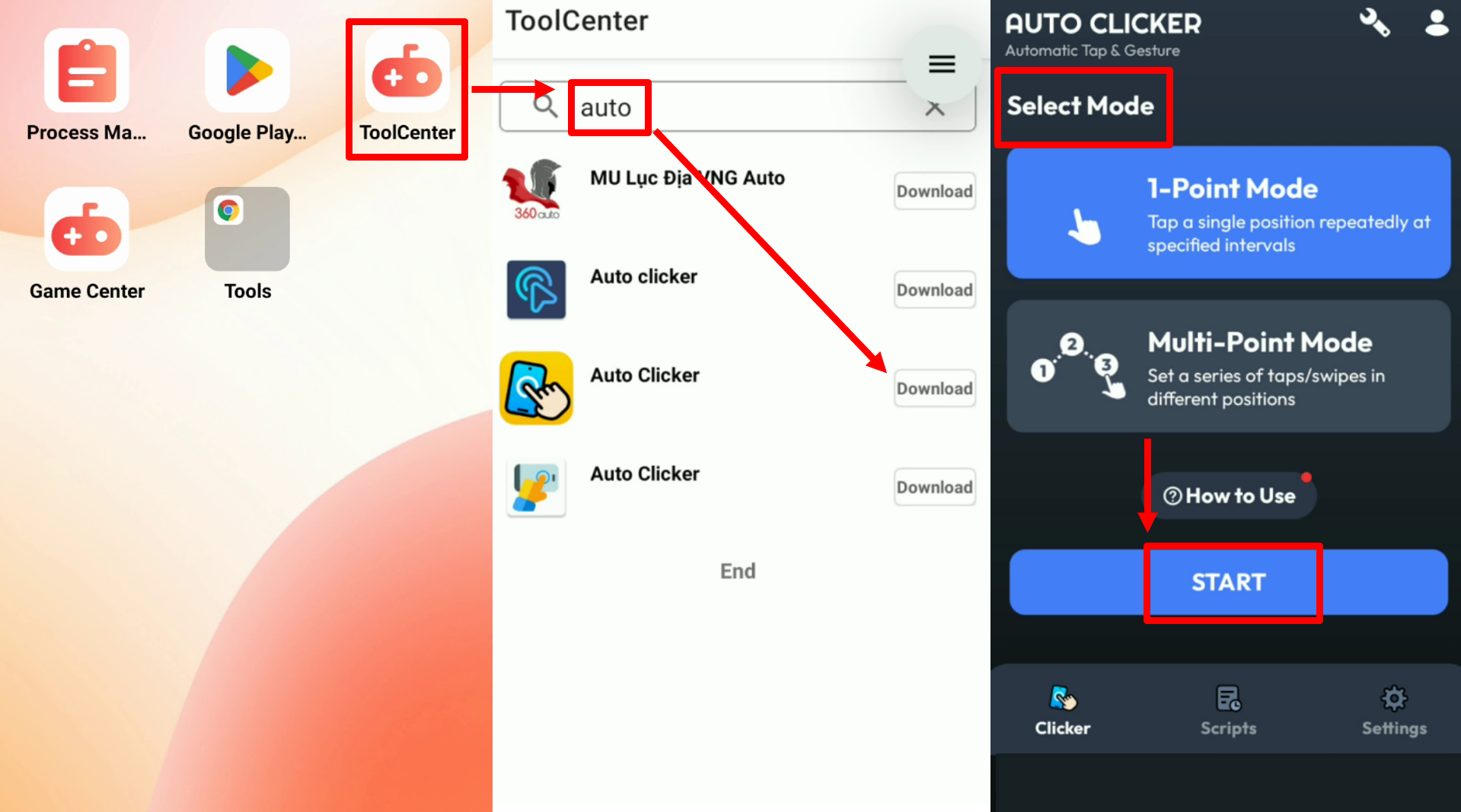
- Configure automation tools (scheduled tasks, auto-click, etc.)
- Use group-control features to manage multiple cloud instances at once
Now your apps can run around the clock, while you just focus on results.
Smarter Management Starts with UgPhone
With apps becoming more complex, traditional management methods fall short. Cloud phones — and especially UgPhone — offer a stable, intelligent solution:
24/7 uninterrupted running
Multi-account parallel management
Zero strain on your device
Secure data storage and recovery
Stop wasting time on account switching and overheating devices.
Download*UgPhone* today and step into a new era of efficient app management.