


How does cloud mobile enable efficient AFK?

In today’s era of mobile gaming and multi-account management, players share the same frustrations: overheating devices, background processes being killed, random disconnects… all of these pain points make AFK a headache. Today, we’ll show you how cloud mobile, especially*UgPhone*, can solve these issues completely—making AFK smoother, more stable, and stress-free.
1. Pain Points: Why is AFK Getting Harder?
In-game Anti-AFK Systems
Many online games (including popular Roblox titles) have built-in anti-AFK systems. If a character shows no activity for a certain time, the system marks it as “AFK” and kicks the player out. This means even if your device stays on, AFK detection may still force you offline, wasting your effort.

Device Overheating & Battery Drain
Running heavy apps for long sessions makes phones hot and drains battery fast, hurting both experience and hardware.
Complicated Multi-Account Management
Handling multiple accounts traditionally means endless logins and logouts—time-consuming and error-prone.
Resource Drain and Lag
Local AFK consumes memory and processing power, causing lags and slowing down everything else on your device.
2. Enter Cloud Mobile: How UgPhone Solves Every AFK Problem
Looking for effortless AFK? Cloud mobile is the answer—and UgPhone stands out as one of the most reliable solutions today:
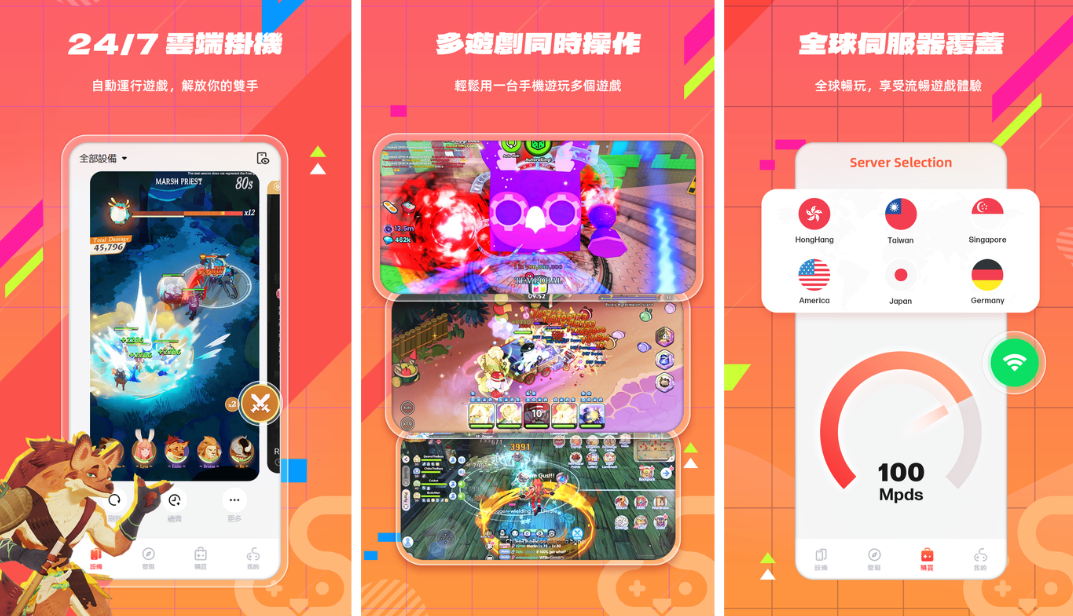
- 24/7 Always Online, No Disconnections
Your AFK progress keeps running in the cloud even if your device shuts down or disconnects. - Unlimited Multi-Instances for Multi-Accounts
One UgPhone account can launch multiple cloud instances at once, so you can run several games or accounts simultaneously without switching. - Low Latency with Global Nodes
UgPhone runs across 80+ nodes and 30+ data centers worldwide, ensuring smooth operation with minimal delay.
- Cloud-Based, No Stress on Your Device
No overheating, no battery drain, no performance loss—safer and more efficient AFK. - Extended Free Trial
New users get long trial periods for free before deciding to continue.
As one Reddit user shared:
“Even if you shut down your device, Roblox keeps running smoothly on UgPhone.” (Reddit)
All signs point to UgPhone being the ideal AFK companion.
3. Real Benefits: Why UgPhone Delivers the Best AFK Experience
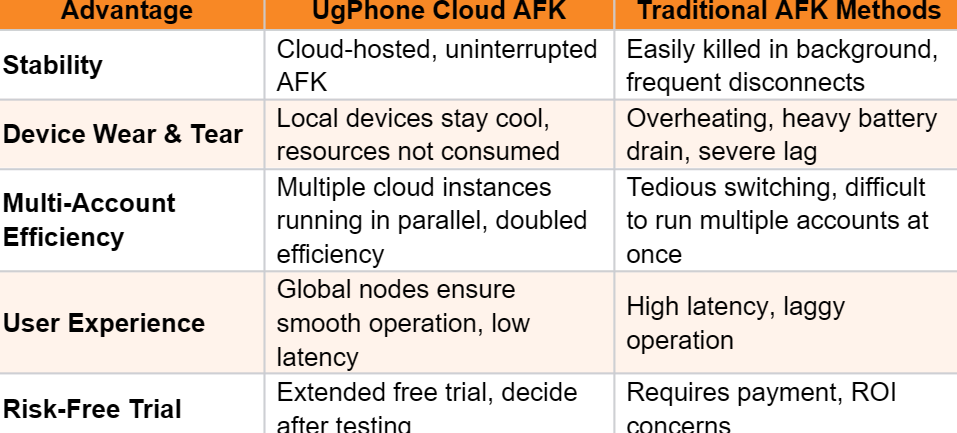
From stability and efficiency to smooth performance and cost savings, UgPhone clearly outperforms traditional AFK setups.
Three Easy Steps: Start Your Cloud AFK Journey
Step 1: Download, Install & Register
Go to the*UgPhone Cloud Phone*official site or app store, download the client, and register an account. It supports multiple platforms for easy onboarding.

Step 2: Log Into Your Game & Start a Cloud Instance
Sign into Roblox or your target game account, then launch one or more cloud instances to AFK multiple accounts in parallel.
Step 3: Configure Auto Scripts & AFK Strategy
Use built-in auto clickers, scheduled tasks, or scripts to automate daily quests, farming, and other tasks. Monitor progress while your character keeps working in the cloud.

Advanced users can even enable group control to manage multiple cloud instances at once—perfect for large-scale farming or team play.
AFK Made Easy—Start with UgPhone!
Stop letting overheating, disconnects, and interruptions slow you down! With UgPhone Cloud Phone, you can finally enjoy true high-efficiency AFK: 24/7 continuous running, multi-account parallel play, zero device strain, and stable performance.
Download*UgPhone Cloud Phone*today, try it free, and take your AFK grinding to the next level!









