



Efficiently Manage Multiple Twitter Accounts with UgPhone


In today’s digital marketing landscape, Twitter, a globally renowned social media platform, has become a crucial channel for businesses and personal brands to expand their influence. However, as the platform intensifies its crackdown on inauthentic activity and automated behavior, bulk-managing multiple accounts has become increasingly challenging.Twitter identifies violating accounts by monitoring user behavior, frequent IP address, and automated operations.
This article will introduce how to achieve secure and efficient bulk management of multiple Twitter accounts using*UgPhone*, effectively avoiding the risk of account bans.
I. Twitter Account Suspension Mechanism Analysis
To safely operate multiple Twitter accounts, firstly you need to understand the platform’s account suspension mechanism.
Twitter primarily identifies suspicious activity by monitoring user behavior.
The following situations are highly likely to trigger account suspension:
●Inauthentic Activity: Repetitive posts, bulk messaging, and other non-organic behavior can trigger flags for spam or bot activity.
●IP Address Issues: Frequently logging into multiple accounts from the same IP, or rapidly changing IPs, greatly increases suspension risk.
●Automation Detection: Using unauthorized tools or scripts for bulk operations often leads to account bans if detected.
Understanding these triggers is the first step toward developing a safe and effective management strategy.
II. Core Challenges of Bulk Twitter Account Management
Managing multiple Twitter accounts in bulk presents several key challenges:
●Unavoidable Account Suspension Risk: It’s difficult to fully mimic genuine user behavior across multiple accounts. Automated scripts can leave detectable traces, leading to bans for entire account groups
●Inefficient Account Management: Manually managing multiple accounts is not only time-consuming and labor-intensive but also makes maintaining consistent activity difficult.
●Severe Content Homogenization: Creating diverse and personalized content for multiple accounts is a significant challenge, making them being flagged as spam by the platform.
●Unstable Network Environment: When using traditional VPN or proxy IP to switch between different network environments, problems such as unstable connections and slow speeds are common.
To deal with these challenges, finding a solution that improves efficiency while ensuring security is imperative.
III. UgPhone Cloud Phone Solution Enables Efficient Matrix Management
UgPhone Cloud Phone provides a complete and secure solution for the batch operation of multiple Twitter accounts through advanced cloud virtualization technology.
●Isolated Virtual Environments: Each Twitter account operates within a separate virtual phone instance, assigned unique IP addresses from global cloud servers to prevent correlation.
●Smart Automation Intervals: Configure randomized delays between actions to mimic human behavior, reducing the risk of automation detection.
●Unified Management Panel: Control hundreds of accounts from a single dashboard, with features for one-click publishing, scheduling, and bulk engagement.
●24/7 Stable Operation: Leverage high-availability data centers for continuous, stable uptime, eliminating local network lag and instability.
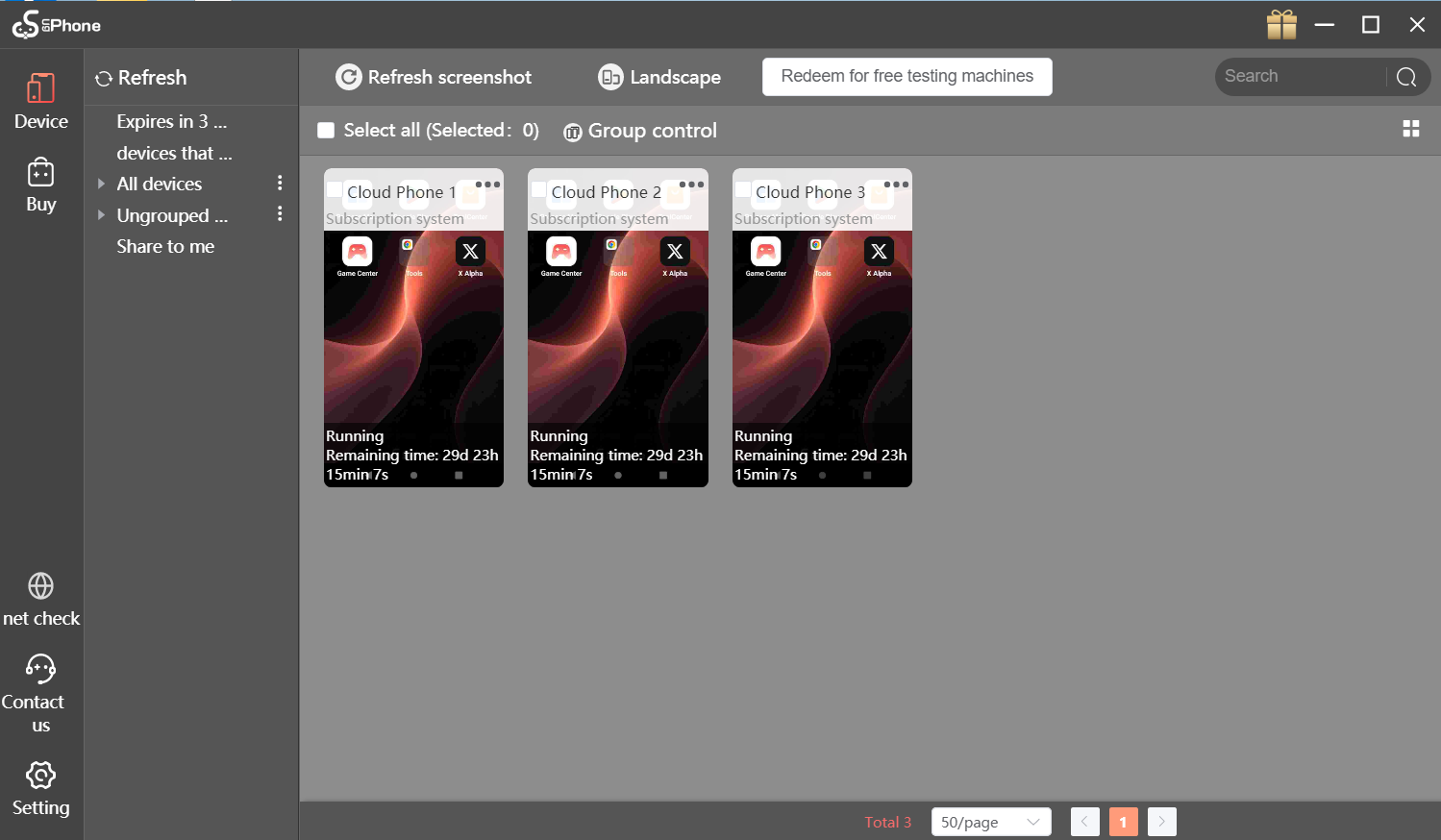
IV. How to Manage Twitter Accounts in Batch Using UgPhone
1.Download, Installation, and Registration
Visit the*UgPhone* official website or app store, download and install the client, and complete account registration. Supports multiple platforms and is easy to use.

2. Purchase the corresponding configuration on the UgPhone platform.

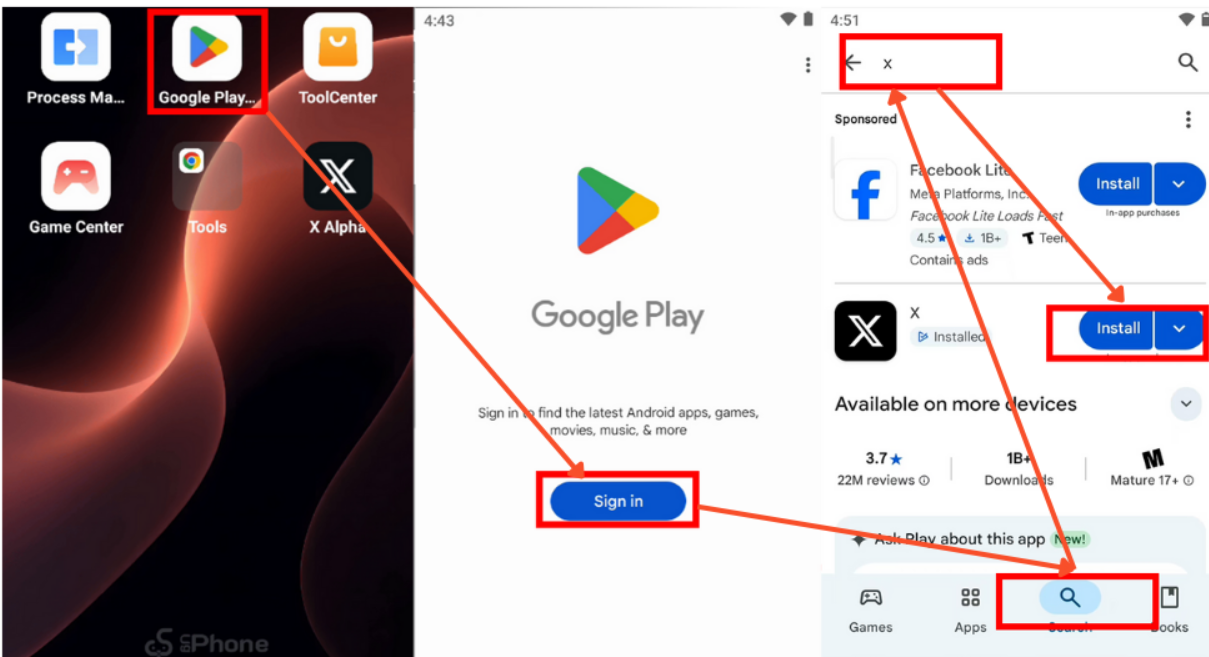
3. Search for and download X (formerly Twitter) from the Google Play Store.
4. Automated Task Flow Configuration
1. Batch Content Posting: Upload materials and set scheduled posting times to ensure content is posted at the optimal time, increasing exposure.
2. Smart Interactive Tasks: Use preset scripts to set parameters that mimic real user behavior, such as random scrolling time and a 5-8 second pause before liking, reducing the risk of account suspension due to frequent operations.
For users who need to efficiently manage multiple Twitter accounts, batch automation is a key strategy for improving operational efficiency. Using specialized tools can simplify processes, reduce manual operations, and effectively lower the risk of account bans.
Now you can say goodbye to manual management hassles! Easily and securely manage multiple Twitter accounts with*UgPhone* cloud-based mobile automation tools!









