


AFK in Roblox Sailor Piece Without Scripts? Combining Auto Skill and Auto Clicker

In the islands of Roblox Sailor Piece, whether you want to max out your level, accumulate massive Aura Crates, or get top-tier Bloodline Stones, you need extremely long online time. Facing this high-intensity grinding, AFK farming has become a required course for players.
However, when searching for AFK guides, many beginners are often led to download various scripts, Hubs, or executors. This deters many players—after all, no one wants their hard-earned account permanently banned because of scripting.
So, can you achieve fully automated AFK farming in “Sailor Piece” without scripts? The answer is yes! By cleverly utilizing the game’s built-in auto skill and auto quest mechanisms, combined with a simple auto clicker, you can build a 100% safe and compliant automated resource pipeline. This article will break down the complete logic of this “scriptless AFK” method for you!
I. Built-in Mechanisms in Sailor Piece Naturally Suited for AFK
The development team of “Sailor Piece” actually understands players’ pain points very well, so they have built very powerful semi-automated features into the game. As long as you know how to turn them on, you are already halfway to success:
1. Auto Skill Release
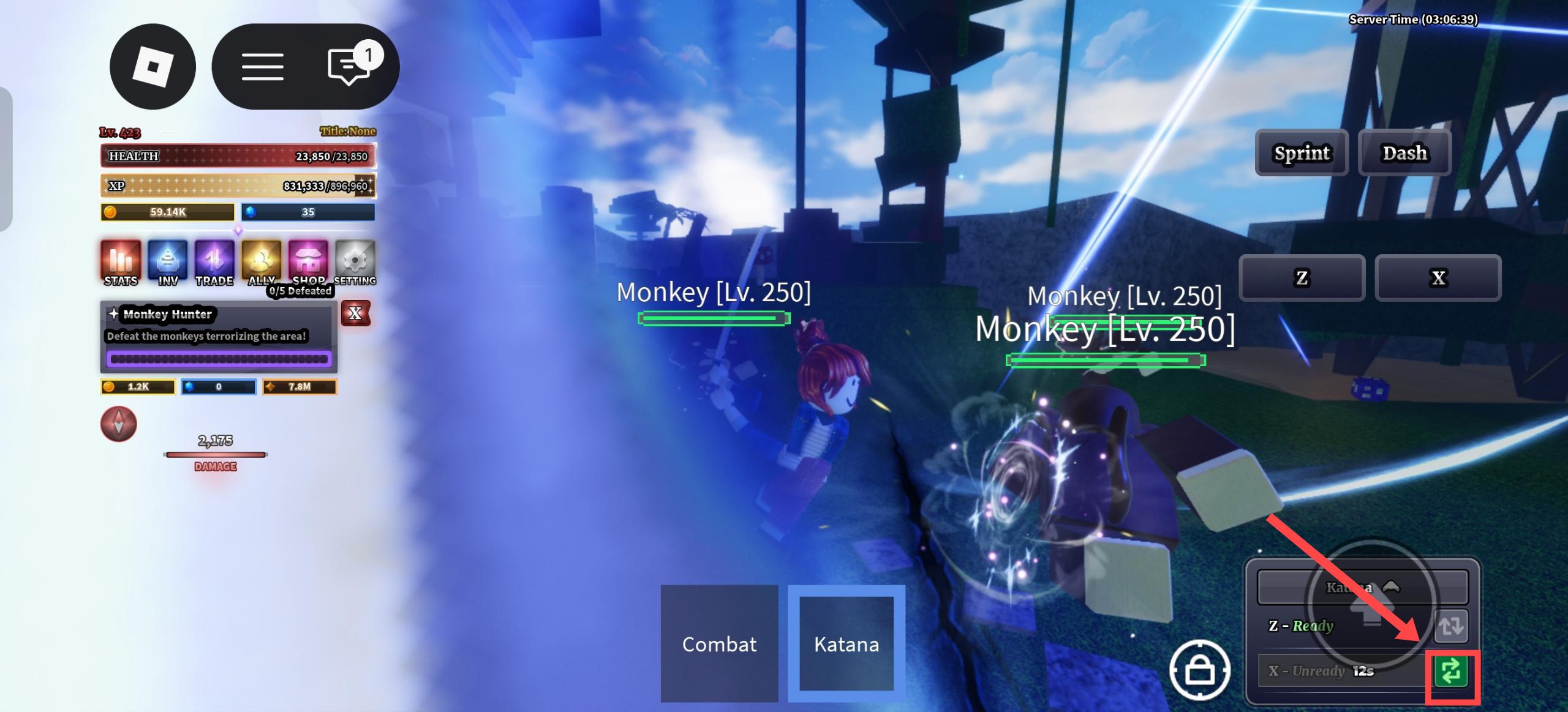
You don’t need any external macro commands to frantically press the keyboard. Next to the weapon/skill bar on the game interface, there is a small toggle button. Click it, and the system will automatically and seamlessly cast the skill for you in a loop as soon as the cooldown ends.
2. Auto Quest Repeat
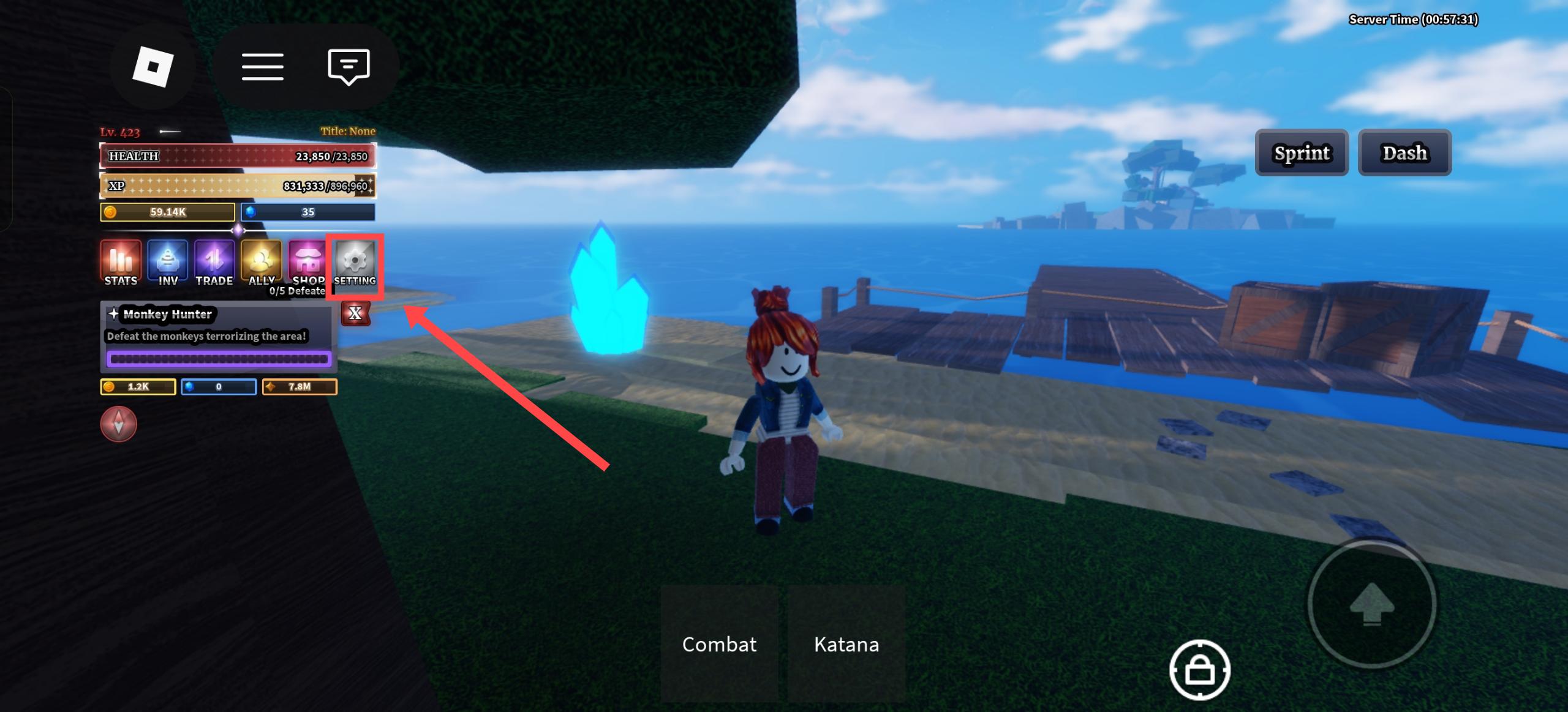
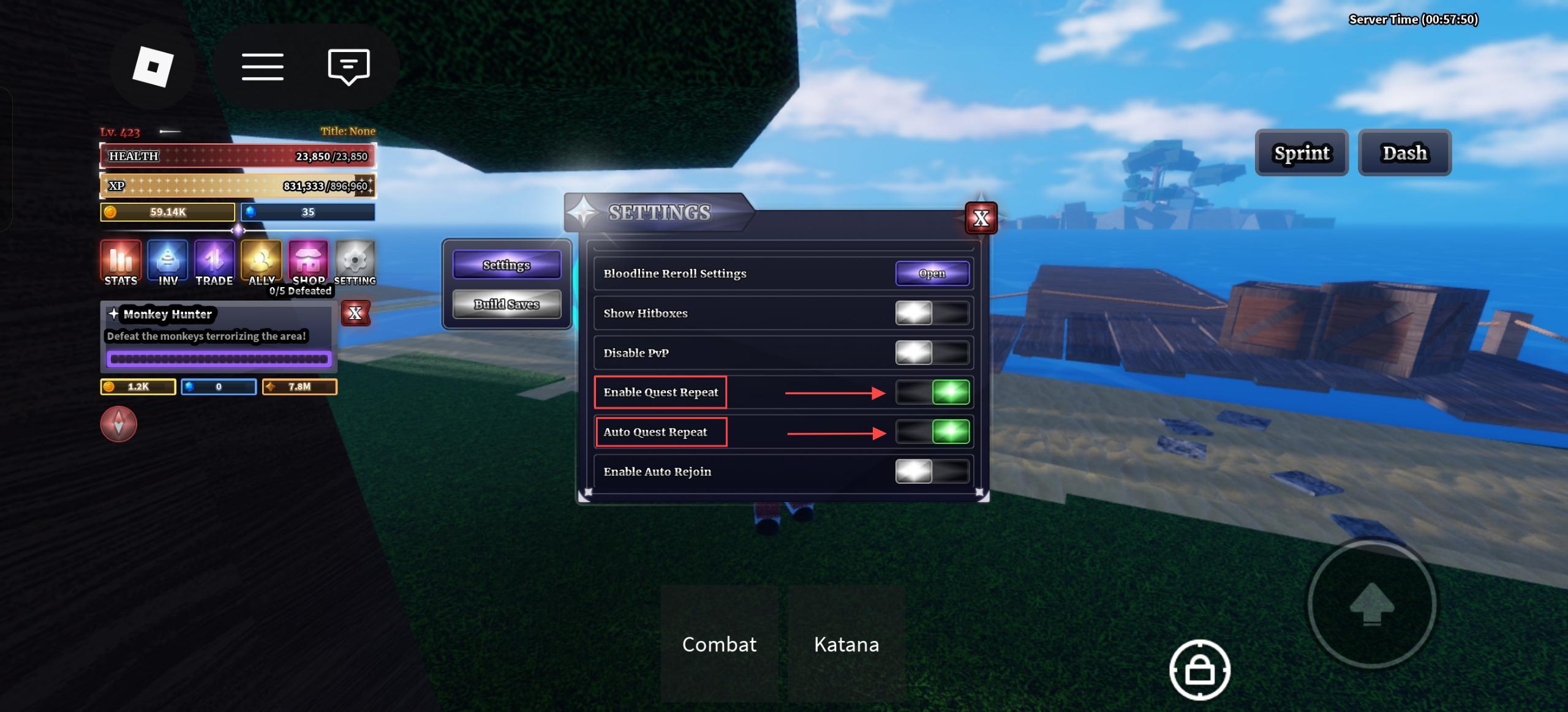
This is a god-tier skill for leveling up and grinding resources! Open the Settings menu in the top left corner, turn on “Enable Quest Repeat” in the settings panel, and then enable “Auto Quest Repeat”. After manually accepting the current quest once, the system will automatically continue the same quest upon completion, usually saving you from running back and forth between the NPC and the monsters.
3. AoE Skills that Perfectly Fit the Loop
The skills of some fighting styles in the game are naturally suited for AFK. As long as you stand in the center of the monster spawn point and use auto skill release to deal large-scale AoE damage, the monsters will be instantly cleared as soon as they spawn, forming a perfect internal loop.
II. Why Do Many People Fail to AFK for Long Despite Being Able To?
Since the game has so many useful built-in features, why do many players find themselves disconnected or having farmed nothing when they wake up after trying to AFK overnight? Because “scriptless AFK” has four fatal pain points:
- Roblox’s 20-Minute Anti-AFK Mechanism: Even if your character is automatically casting skills and accepting quests, as long as the Roblox system detects no physical click interaction from your screen/mouse within 20 minutes, it will forcefully kick you out of the game.
- Position Shift and Monster Pushing: If your damage is not enough to kill in one hit, monsters may have collision volume when hit, slowly pushing your character away from the optimal AFK spot, causing your skills to miss.
- The Sword of Damocles of Script Banning: To solve the above problems, some people take the risk of using third-party executors. But Roblox’s anti-cheat system is becoming increasingly strict. Once detected, your top-tier traits and rare auras will vanish instantly; the risk is extremely high.
- High Device Occupation for Long-term AFK: Running Roblox overnight on your own phone or computer causes severe device heating and accelerated battery wear. Worse still, your device is completely hijacked during AFK, preventing you from doing anything else.
III. The Truly Effective “Scriptless AFK” Safe Combination
To avoid the risk of banning and solve the disconnection problem, advanced players have summarized a truly effective and 100% safe “scriptless AFK” combo:
1. Auto Skill + Auto Quest = Output and Profit Loop
Use the game’s built-in auto skill release to continuously clear monsters, and use the quest repeat feature to automatically settle and loop experience and gold. This is the “engine” of the entire AFK pipeline.
2. Auto Clicker = Physical Anti-Disconnection
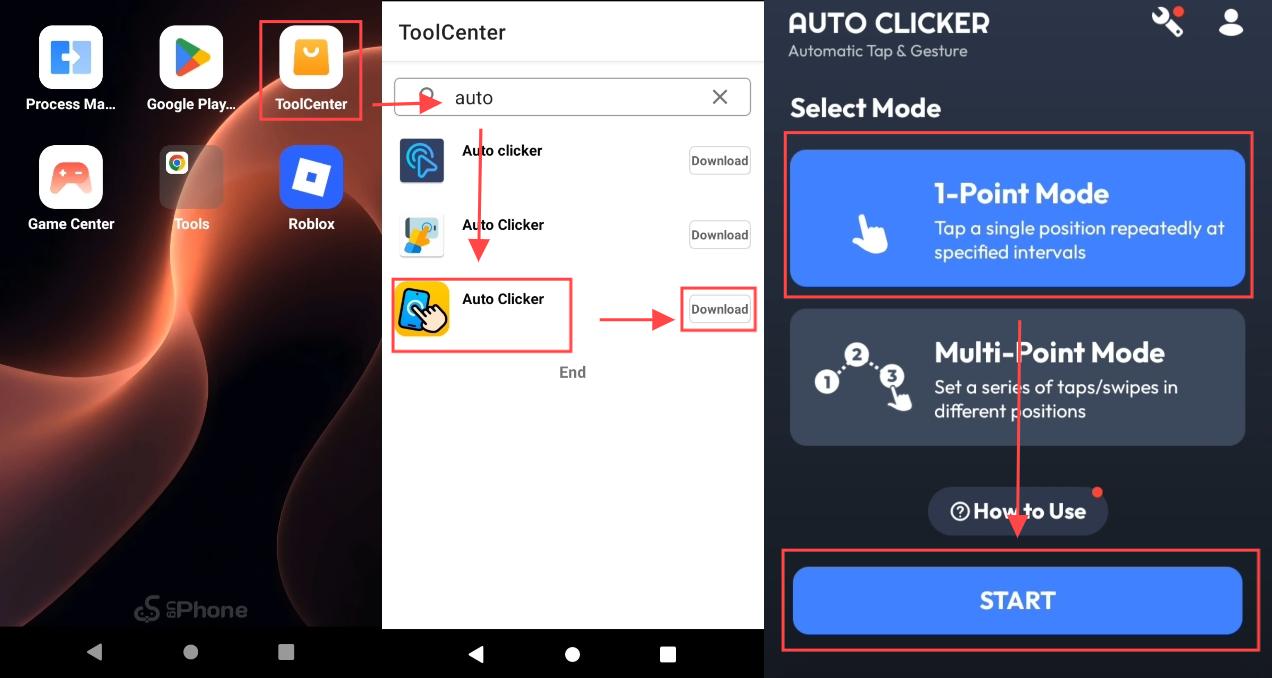
This is the core replacement for illegal scripts! Run a basic auto clicker on your phone or computer, setting it to perform a single touch on a blank area of the screen every 10 to 30 seconds. This involves no cheat codes; it’s simply to tell the Roblox system “I’m still in front of the screen,” perfectly cracking the 20-minute disconnection mechanism.
3. Private Server = Absolute Safe Environment
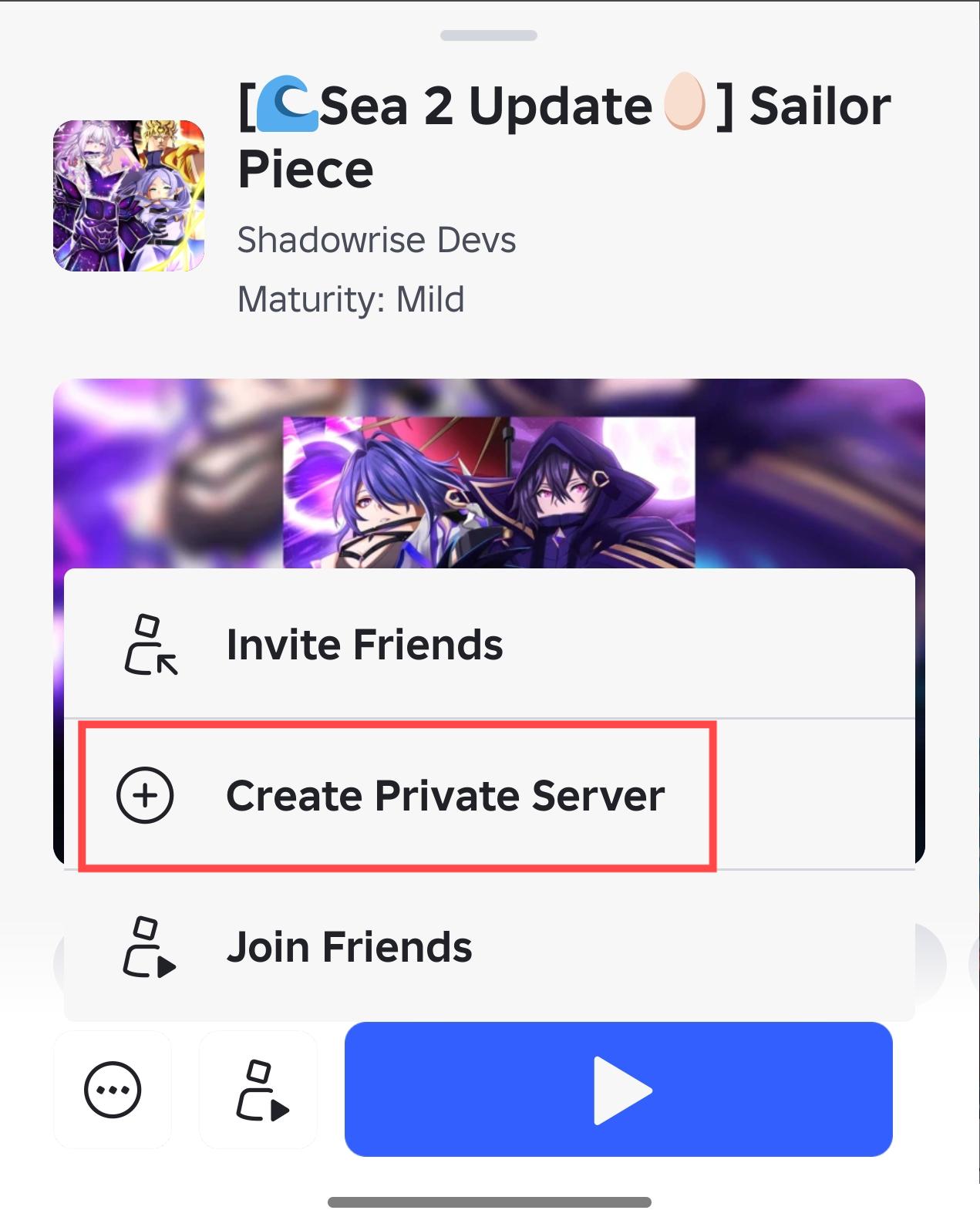
AFK farming in a public server makes you highly susceptible to being maliciously pushed away by other players or having your monster resources stolen. Entering a private server for AFK ensures your position is never disturbed, maximizing your profits.
IV. UgPhone: The Ultimate Solution to Make “Scriptless AFK” Rock Solid
When you master the safe AFK logic above, the last question is: how to solve the problems of device heating and long-term occupation?
At this time, UgPhone cloud phone becomes the final puzzle piece in your AFK pipeline. It is not a cheat tool that replaces gameplay, but provides you with a “cloud clone” that never powers off and never heats up:
- Continuous Cloud Online, Freeing Your Local Device: Hand over the “Sailor Piece” AFK task to UgPhone, and you can directly turn off your local phone screen or even disconnect the network. The cloud server will run stably for you 24/7, completely bidding farewell to device heating and battery anxiety.
- Pure Environment, Safely Running Auto Clicker: UgPhone has a complete built-in Google Play ecosystem. You can directly and safely download a compliant auto clicker from the cloud phone’s tool center, no root required, no need to worry about carrying viruses, perfectly adapting to Roblox’s anti-disconnection needs.
- Multi-Account Parallel, Doubling Resource Profits: For players with advanced needs, you can use multiple UgPhones to mount multiple alt accounts simultaneously. One line farms Bloodline Stones, another farms Aura Crates, achieving a dimensional strike in resource acquisition.
V. Basic Operation Tutorial: 4 Steps to Start Safe AFK
Now, let’s combine UgPhone with the game’s built-in features to practically build your safe AFK pipeline:
Step 1: Turn on In-Game Automation
Enter “Sailor Piece”, open Settings -> Gameplay, first check “Enable Quest Repeat”, then check “Auto Quest Repeat”. Next, click to turn on “Auto Skill Release” next to your main DPS skill.
Step 2: Configure Auto Clicker in UgPhone
Open the UgPhone cloud phone, go to the tool center to download a basic auto clicker. Set it to “Single Point Mode”, and set the click interval according to your needs, recommended to be once every 15 to 30 seconds.
Step 3: Enter Private Server and Precise Positioning
Open Roblox in the cloud phone and enter your private server. Walk to your desired monster farming spot, ensure your damage can quickly one-shot the monsters, drag the auto clicker’s crosshair to a blank area of the screen or the jump button, and click to start running.
Step 4: Short-Term Test and Screen-Off Harvesting
Strongly recommended: Before going to sleep, stare at the screen for a while to confirm that the character has not been pushed away by monsters, the skill loop is normal, and has not been kicked out by the system. Once everything is stable, you can directly close the UgPhone App, go to sleep with peace of mind, and wait for the overflowing loot the next day!
In “Sailor Piece”, wanting to become a top powerhouse doesn’t mean you have to bear the huge risk of being banned for using scripts. By reasonably utilizing auto skill release and combining it with a basic auto clicker, you can completely build a compliant and safe resource pipeline.
And when you move this concept to UgPhone Cloud Phone, you not only protect your account but also free your hands and physical devices. Technology changes the way we play games; safe automation is the long-term solution!
If you want to see the Sea 1 AFK route, click here!
👉 Ready to experience zero-heating, zero-loss 24-hour safe AFK? Download and experience UgPhone now, and start your cloud sailing era!









