
Stop Grinding! Become a Bloxburg Pizza Delivery Legend with UgPhone


In the world of Bloxburg on Roblox, the pizza delivery job is widely known as the best money-maker. But leveling all the way to 50 can feel endless—long hours of grinding drain both your time and your enjoyment.
Now with*UgPhone Cloud Phone*, everything becomes lighter and easier.
I. What Is the Pizza Delivery Level Tracking Tool?
Pizza Delivery Level Tracker helps players clearly monitor their delivery progress. It lists the XP needed for each level from 1 to 50, the required deliveries, and estimated earnings. With it, you can plan yourer leveling path precisely instead of playing blindly.
It organizes all the hidden data you normally need to calculate manually. With the tool, you can easily answer questions like:
●“How many levels can I gain in one hour tonight?”
●“What level do I need to reach my monthly income goal?”
●“How much time will the next five levels take?”
This data-driven approach removes the fatigue and uncertainty of grinding and gives every minute of gameplay a clear purpose.
II. Real Pain Points for Bloxburg Players
High time cost: Reaching level 50 requires around 83 deliveries, totaling nearly 7 hours of pure gameplay.
1.Device limitations: Long sessions cause overheating, fast battery drain, and reduced device lifespan.
2.Interrupted progress: Calls, messages, or app switching can break your session and waste progress.
3.Low efficiency: Manual play is hard to maintain, and fatigue easily slows down your speed.
III. UgPhone’s Complete Solution
1.24/7 Continuous Leveling
UgPhone keeps your game running even when your personal device is off—true “offline leveling.”
2.Multi-Account Operation
Run several accounts at once. Your main account levels up while side accounts support resource farming.
3.Smart Task Automation
Built-in scripts can optimize delivery routes and prioritize long-distance orders for maximum XP.
4.Seamless Cross-Device Access
Switch between phone, tablet, or PC at any time—your progress syncs instantly.
5.Zero Local Resource Consumption
Everything runs in the cloud. No heat, no battery drain, no storage pressure.
IV. Quick Start Guide for UgPhone
Step 1: Create an UgPhone account and log in.
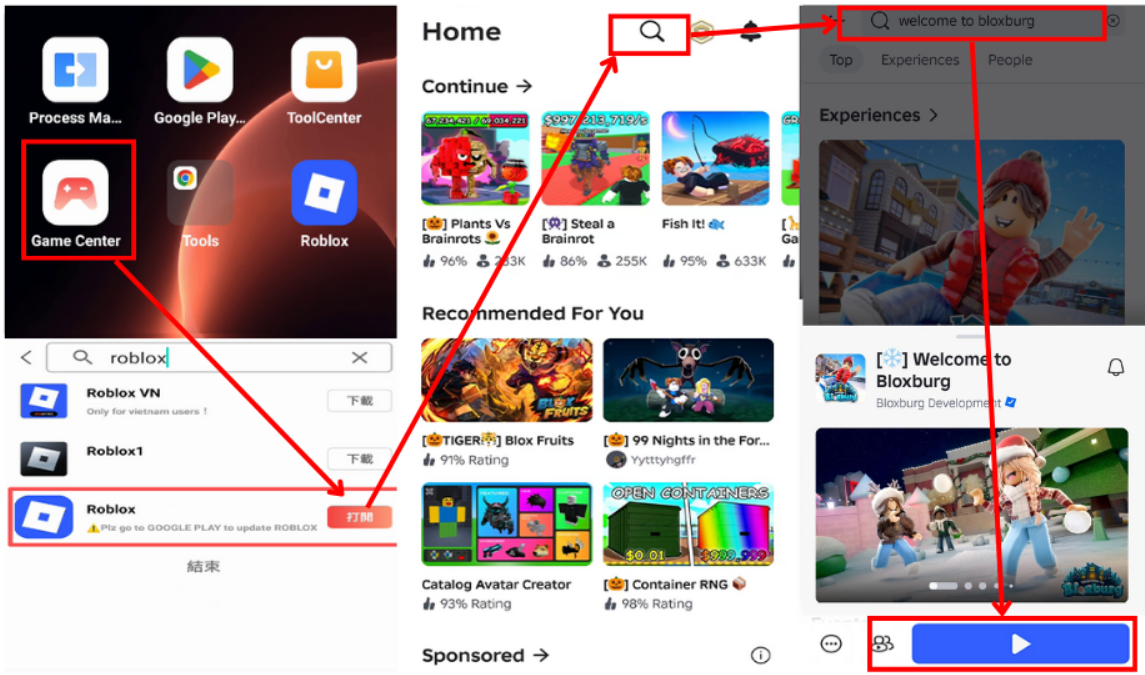
Step 2: Download Roblox on your UgPhone device, log into your Roblox account, and launch the game you want to level up in.
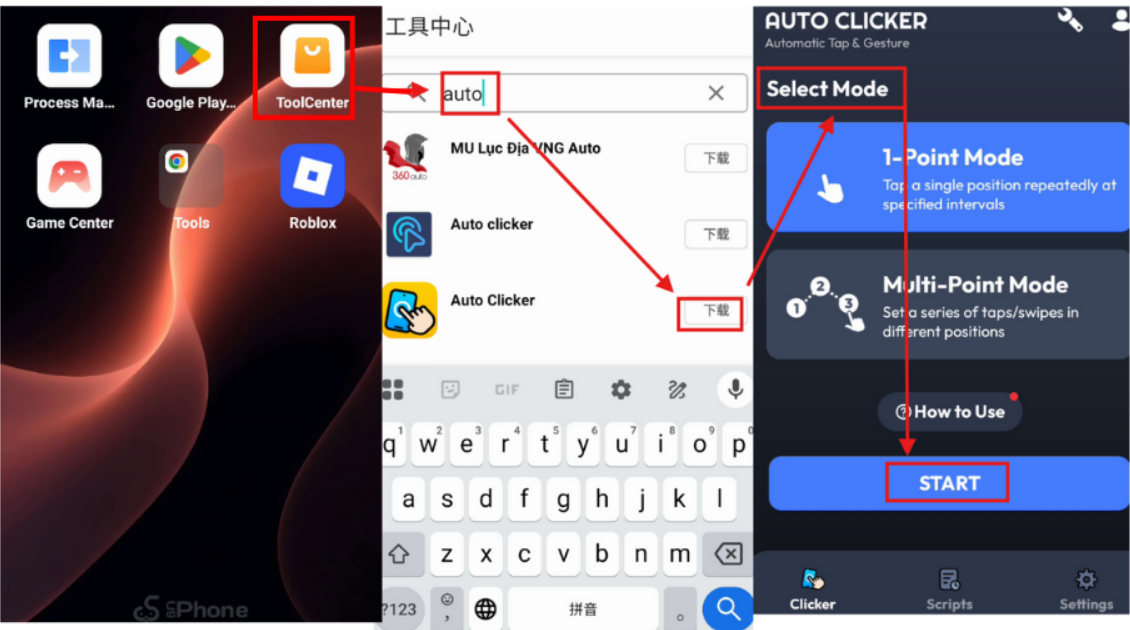
Step 3: Install a auto-clicker on UgPhone, configure it, and let it run inside your Roblox game.
UgPhone Cloud Phone redefines the Roblox experience, turning tedious leveling into a smart, automated journey. Whether you’re a casual player or a speed-leveling enthusiast, UgPhone helps you enjoy the game while reaching your goals effortlessly.
Experience *UgPhone Cloud Phone*now—level up smarter, not harder. Enjoy the fun without the grind!