Anime Expeditions Auto Play Guide: Effortless Cloud AFK with UgPhone

After the release of the new “Warriors Saga” update in Anime Expeditions, alongside East Town, Tower, new units, and new events, a feature perfectly suited for long farming sessions was added—Auto Play. Auto Play can automatically place units and supports General Settings, Per-Slot Settings, and Preset saving/loading, eliminating the need to redo the same setup every match for repeated stage farming.
If you frequently need to repeatedly farm Story, Mastery, or other fixed stages, this update can significantly reduce the manual operations required before going AFK. Combined with the UgPhone cloud phone, once Auto Play is set up, you can let Roblox run continuously in the cloud without occupying your own phone or computer for extended periods.
I. What is Auto Play in Anime Expeditions?
Auto Play is not simply dropping all units randomly; it is an automated farming system that can be configured in advance.
In General Settings, players can set the Zone Position, directly selecting the main deployment area on the map; they can also separately adjust the Normal Unit Range and Farm Unit Range to control the placement range of combat units and Farm Units.
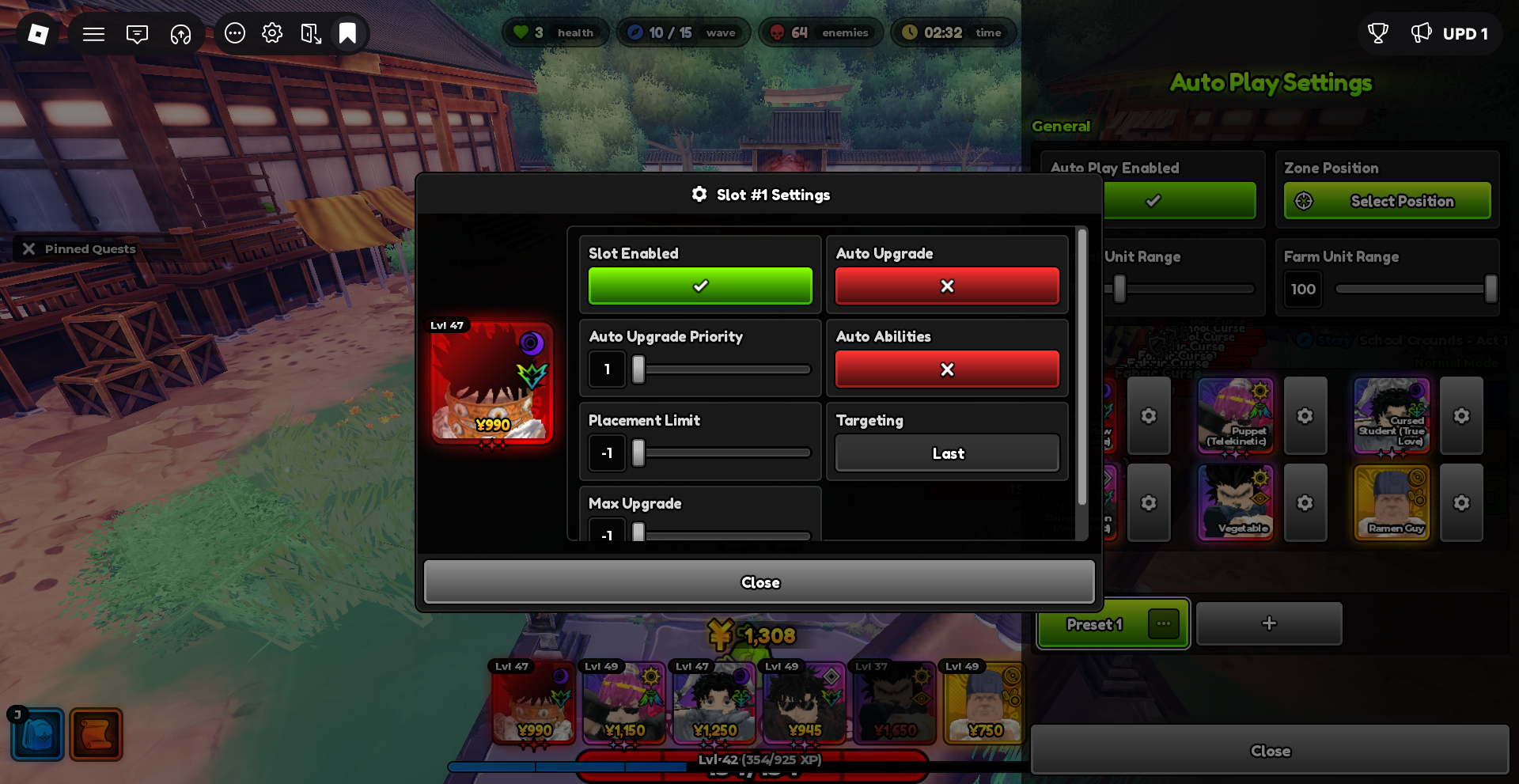
In Per-Slot Settings, each team Slot can independently configure Auto Upgrade, Auto Upgrade Priority, Placement Limit, Max Upgrade, Auto Abilities, and Targeting. This way, the main DPS, support units, and economy units can use different automation rules.
Once Auto Repeat is enabled, the selected Zone Position will continue to be used for the next match, making it highly suitable for repeated farming of the same Stage. Auto Play also supports saving and loading Presets for quick access to common configurations.
II. How to Set Up Auto Play for AFK Farming?
First, enter the target stage you plan to farm for a long time and open Auto Play Settings.
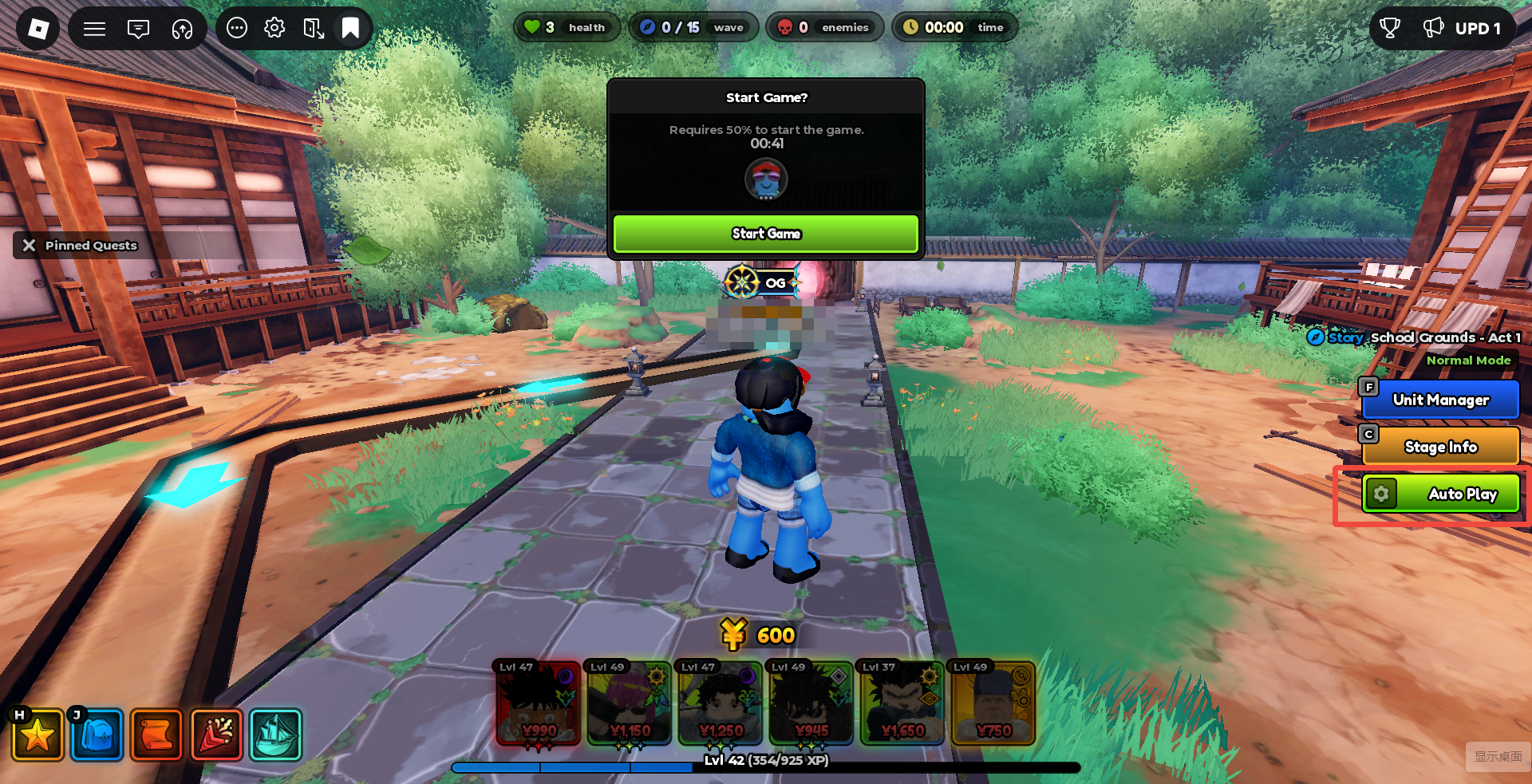
Step 1: Select Zone Position
Click Zone Position → Select Position, and choose a location suitable for concentrated firepower. Prioritize bends or long-path coverage areas, rather than strictly selecting the monster spawn point.
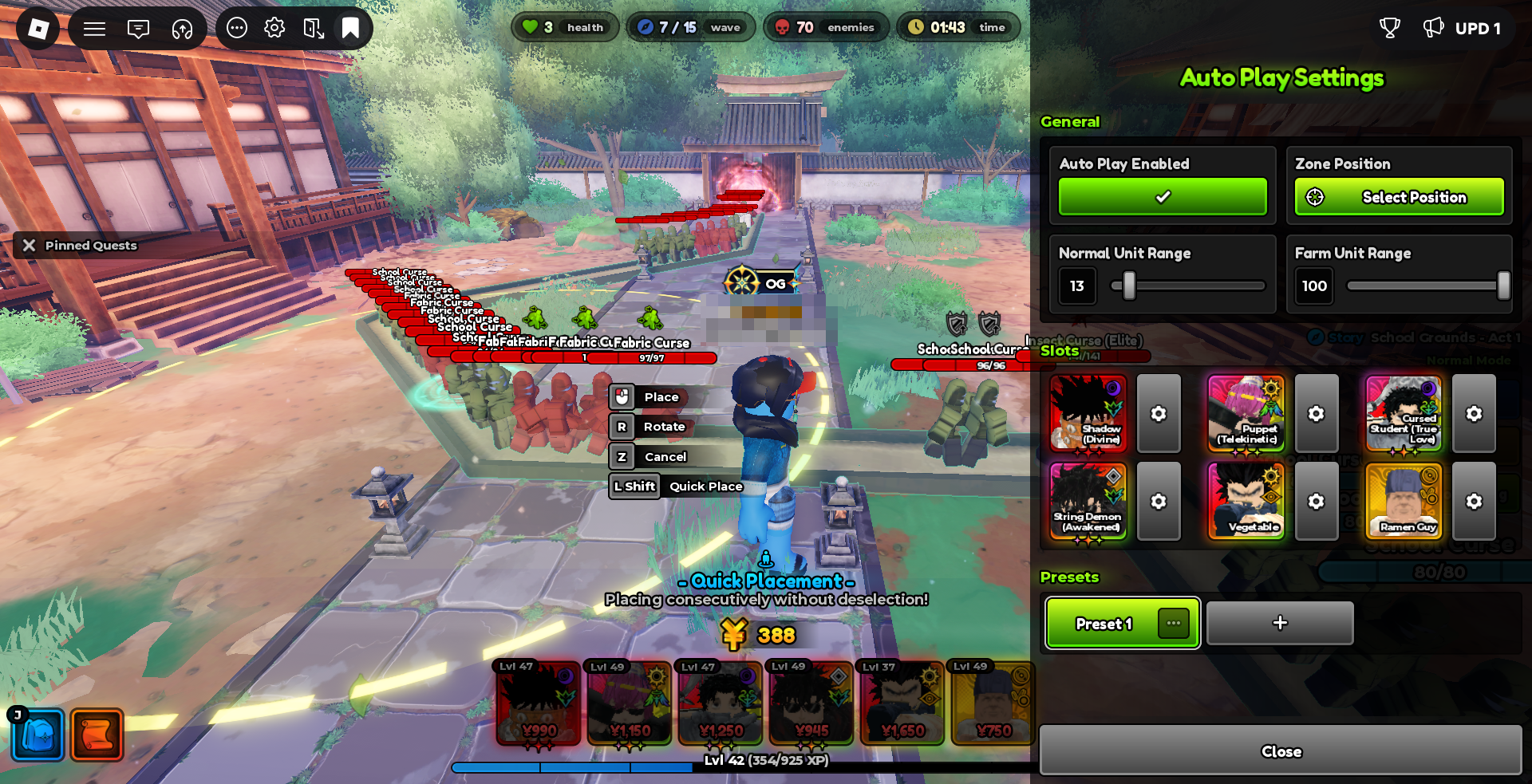
Step 2: Adjust Placement Range
Adjust the Normal Unit Range and Farm Unit Range according to the map size. The two can be set separately, so Farm Units do not need to be crowded in the same area as the main DPS.
Step 3: Configure Each Slot
Depending on the unit’s purpose, choose whether to enable Auto Upgrade and Auto Abilities, and adjust the Auto Upgrade Priority, Placement Limit, and Max Upgrade.
Step 4: Enable Auto Repeat
After completing the setup, enable Auto Repeat. It is recommended to observe a few matches consecutively to confirm that units are deployed and upgraded normally, and that the stage can clear consistently every time before starting a long AFK session.
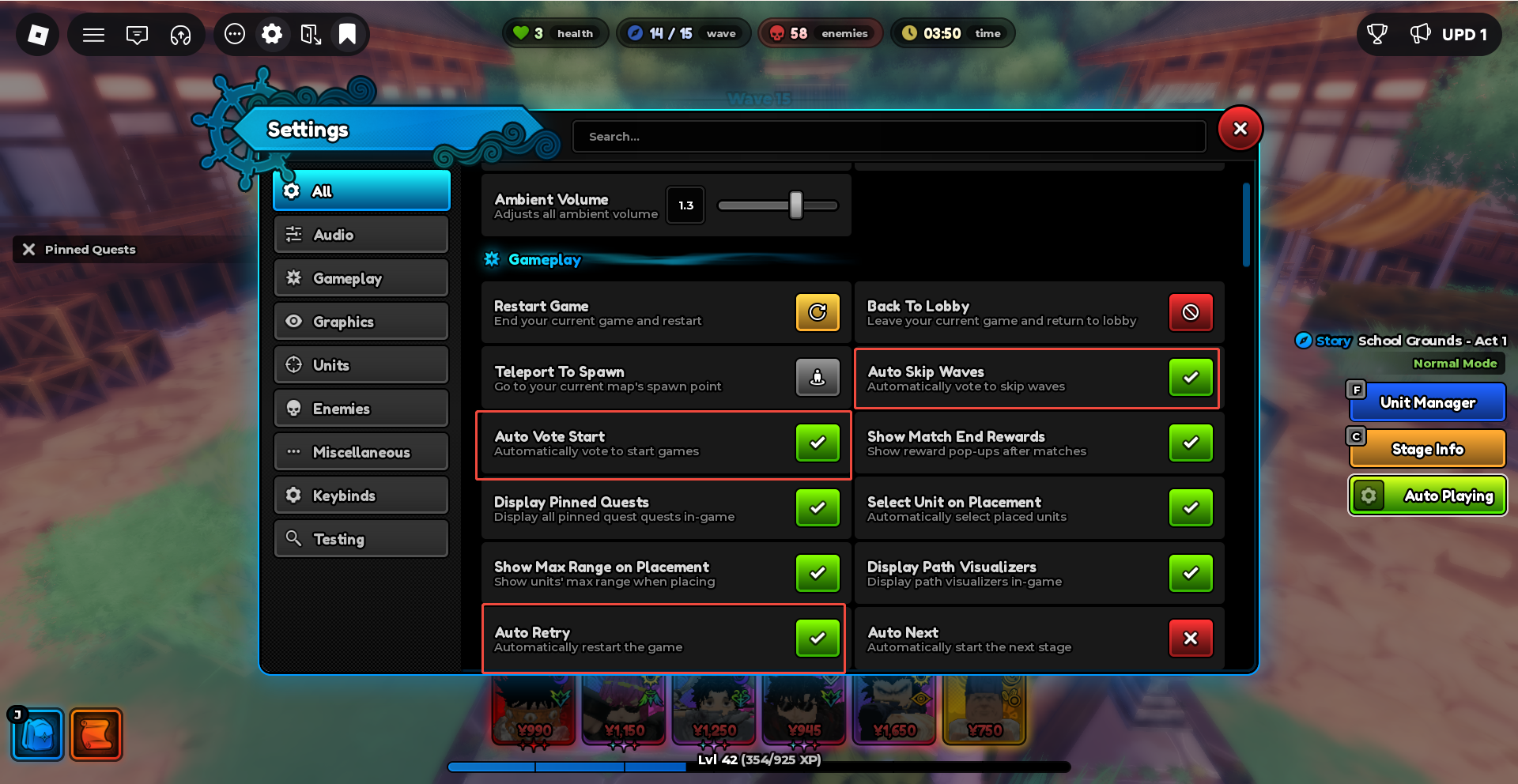
Since Auto Play can directly handle unit placement and upgrades during repeated stage farming, players no longer need to configure complex fixed clicking operations for the farming process itself.
III. Why is Auto Play a Great Match for UgPhone?
Auto Play can reduce repetitive operations during actual farming, but long AFK sessions still require Roblox to stay online continuously. If you use your own phone to AFK directly for hours or even overnight, the device will be constantly occupied by Roblox, increasing overheating and battery drain pressure.
UgPhone allows Roblox to run in a cloud phone, keeping the main device free and reducing the overheating and battery drain pressure caused by running the local device for a long time. After setting up Auto Play, even if you exit the local UgPhone App, the game can continue to run in the cloud. You can reconnect to the cloud phone at any time to check the status or adjust settings. Your physical phone can continue to be used for chatting, working, watching videos, or other applications. This makes Auto Play especially suitable for overnight AFK, or long AFK sessions during work or study.
IV. Start Anime Expeditions Cloud AFK with UgPhone
The setup process is very simple:
- Open UgPhone and enter the cloud phone;
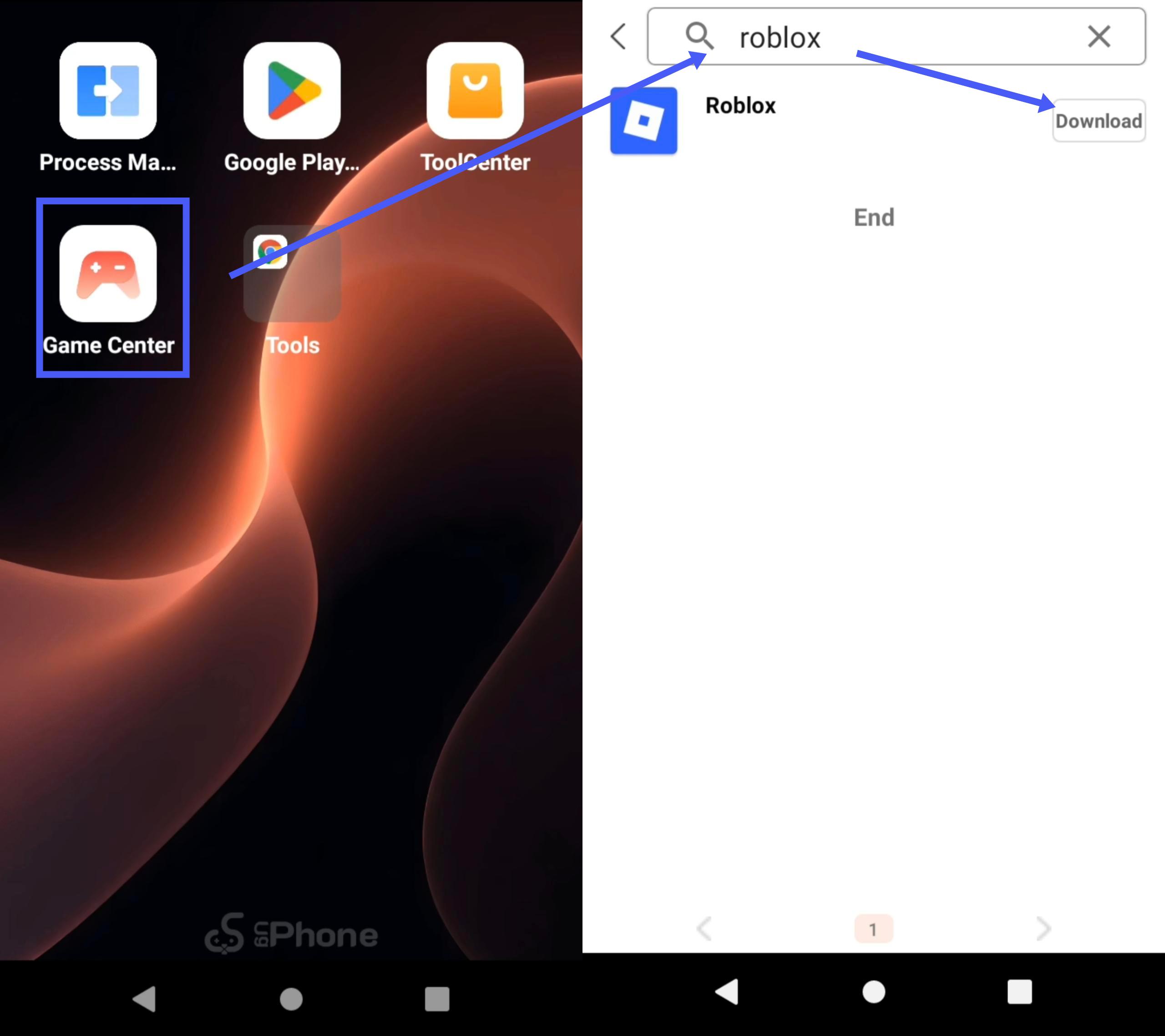
- Install Roblox from the Game Center or Play Store in the cloud phone and log in to Roblox;
- Enter Anime Expeditions and the target stage;
- Set the Zone Position, each Slot, and other Auto Play parameters;
- Enable Auto Play and Auto Repeat;
- After confirming the stage has a stable loop, you can leave the local device.
Auto Play makes repeated stage farming in Anime Expeditions much more automated, and UgPhone can put the configured AFK process in the cloud to run continuously, keeping the main device free.
Run Anime Expeditions on UgPhone now, set up Auto Play, and start an easier cloud AFK farming experience.
If you prefer to directly obtain passive AFK rewards, you can also read this article: https://www.ugphone.com/news/gameguides/n-the-ultimate-anime-expeditions-afk-guide-en.