How to AFK Farm Aura Crate and Cosmetic Crate in Sailor Piece Sea 1? Quake Route Explained

With the full opening of Sea 2 in Roblox Sailor Piece, many advanced players have flocked to explore the new map. However, this does not mean Sea 1 has lost its value. On the contrary, for players who want to steadily accumulate resources and farm Aura and Cosmetic-related rewards long-term, Sea 1 remains a classic sea area with a low threshold, perfect for continuous AFK farming.
In Sea 1, the Aura Crate and Cosmetic Crate are still important resources that many players focus on long-term. Whether it’s to obtain rare cosmetics, supplement character development needs, or Trade for desired items, farming crates remains a very stable growth route.
This article will provide an in-depth analysis of the most classic “Quake Route” for Sailor Piece Sea 1 AFK. We will teach you how to use specific skills and positioning, combined with cloud phone tools, to achieve 24/7 uninterrupted automated crate farming, turning your Alt Account into an endless resource ATM!
I. Why are Aura Crate and Cosmetic Crate Worth Farming Long-Term?
In the resource system of “Sailor Piece,” the reason Aura Crates and Cosmetic Crates can become important targets for long-term AFK farming is mainly due to the following three core values:
1. Both Cosmetic and Development Value
Opening these crates gives you a chance to obtain extremely rare cosmetic items in the game, such as the Commander Cape, Winged Aura, or Fallen Angel, significantly enhancing your character’s visual presence.
2. Hard Currency in the Trade System
In player Trades, the Aura Crate remains one of the more popular circulating resources. For players willing to AFK long-term, continuously hoarding crates is often easier to form a stable, tradable income than sporadically farming miscellaneous materials.
3. Perfect Alt Account Resource Pool
Farming crates doesn’t require complex map running or high operational thresholds, making it very suitable for using an Alt Account for long-term fixed-point AFK in Sea 1, thereby continuously supplying wealth to the main account.
II. Classic Strategy for Sea 1 Fixed-Point AFK: The Quake Route
To farm crates efficiently, you need a Build that can quickly clear groups of monsters. In Sea 1, the Sailor Piece Quake AFK style has always been a very classic and practical route. Its core strategy is as follows:
1. Core Skill: Quake’s C Skill
The C skill of the Quake fruit has excellent AoE monster-clearing capabilities. When cast, it can cover a large attack range simultaneously, making it suitable for repeatedly clearing groups of enemies at a fixed point.
2. Classic Spot: Shinjuku Island Bilateral Clearing
The essence of Sailor Piece Shinjuku AFK lies in positioning. You need to go to Shinjuku Island and find an efficient spot that can simultaneously cover the monster spawn areas on both the left and right sides, such as standing on the top right edge of the rectangular spawn area. Casting Quake’s C skill at this specific location can hit monsters on both sides simultaneously, maximizing efficiency.
3. Stable Drop Loop
Combined with the game’s built-in Auto Skill function, the character will cast the skill in an infinite loop. As long as your damage is enough to one-shot, the monsters will be instantly killed as soon as they spawn, and a screen full of Aura Crates and Cosmetic Crates will automatically fall into your inventory.
III. Fatal Pain Points of Traditional Local Crate Farming
Although the skill loop of the Quake route is very simple, the real difficulty has never been “how to fight,” but “how to AFK for a long time.” If you try to farm crates overnight using your physical phone or computer, you will inevitably encounter the following pain points:
- Device Heating and Battery Wear: Running Roblox for a long time will cause the phone to heat up severely, not only draining power extremely fast but also causing irreversible physical damage to battery life.
- Screen Always On and Anti-Disconnect Dilemma: Roblox has a strict 20-minute no-operation kick mechanism. To prevent disconnection, you must keep the screen on and constantly click, which is highly unrealistic for overnight AFK.
- Device Occupied Long-Term: During AFK, your phone cannot perform any other operations. Once you switch to the background to reply to a message, the game is very likely to disconnect and reconnect, wasting a whole night’s AFK effort.
IV. UgPhone: The Perfect Cloud Solution for Sea 1 Fixed-Point AFK
Want to completely solve the “can’t AFK for long” problem and achieve true 24/7 round-the-clock crate farming? UgPhone cloud phone is your most perfect solution. It transfers the game running environment to the cloud, perfectly matching the fixed-point, repetitive loop AFK needs of Sea 1:
- 7x24 Hours Screen-Off Cloud Running: After hosting “Sailor Piece” on UgPhone, you can directly turn off your local phone screen or even disconnect from the network. The cloud server will continuously run the game for you, occupying no local memory, with zero heating and zero power consumption.
- Pure Environment for Running Auto Clicker: UgPhone has a complete built-in Android ecosystem. You can directly download a compliant Auto Clicker in the cloud. Combined with the Auto Clicker to prevent disconnection, your character can stand and output indefinitely on Shinjuku Island.
- Extremely Suitable for Multi-account Batch AFK: Since farming crates is the best choice for an Alt Account, you can use UgPhone’s Multi-account feature to run multiple cloud phone devices simultaneously. Let multiple Alt Accounts farm crates day and night in different Private Servers, achieving an exponential explosion in resource income!
V. UgPhone Operation Tutorial: 4 Steps to Start Fully Automated Crate Farming
With just a few simple steps, you can set up your exclusive Sea 1 Aura Crate pipeline on UgPhone:
Step 1: Download Game and Auxiliary Tools
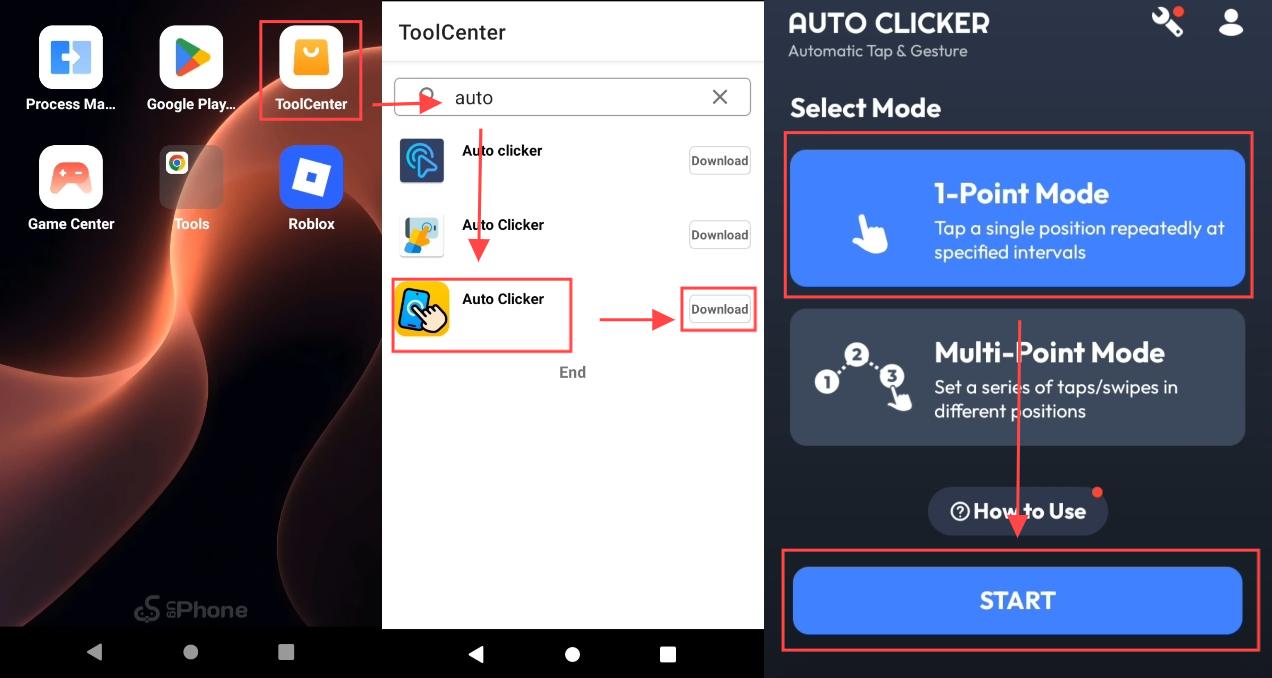
Open the UgPhone cloud phone and download “Roblox” in the Game Center. Then go to the Tool Center to download “Control Screen Orientation” to lock landscape mode, and download a basic Auto Clicker in the Tool Center.
Step 2: Enter Private Server and Graphics Settings
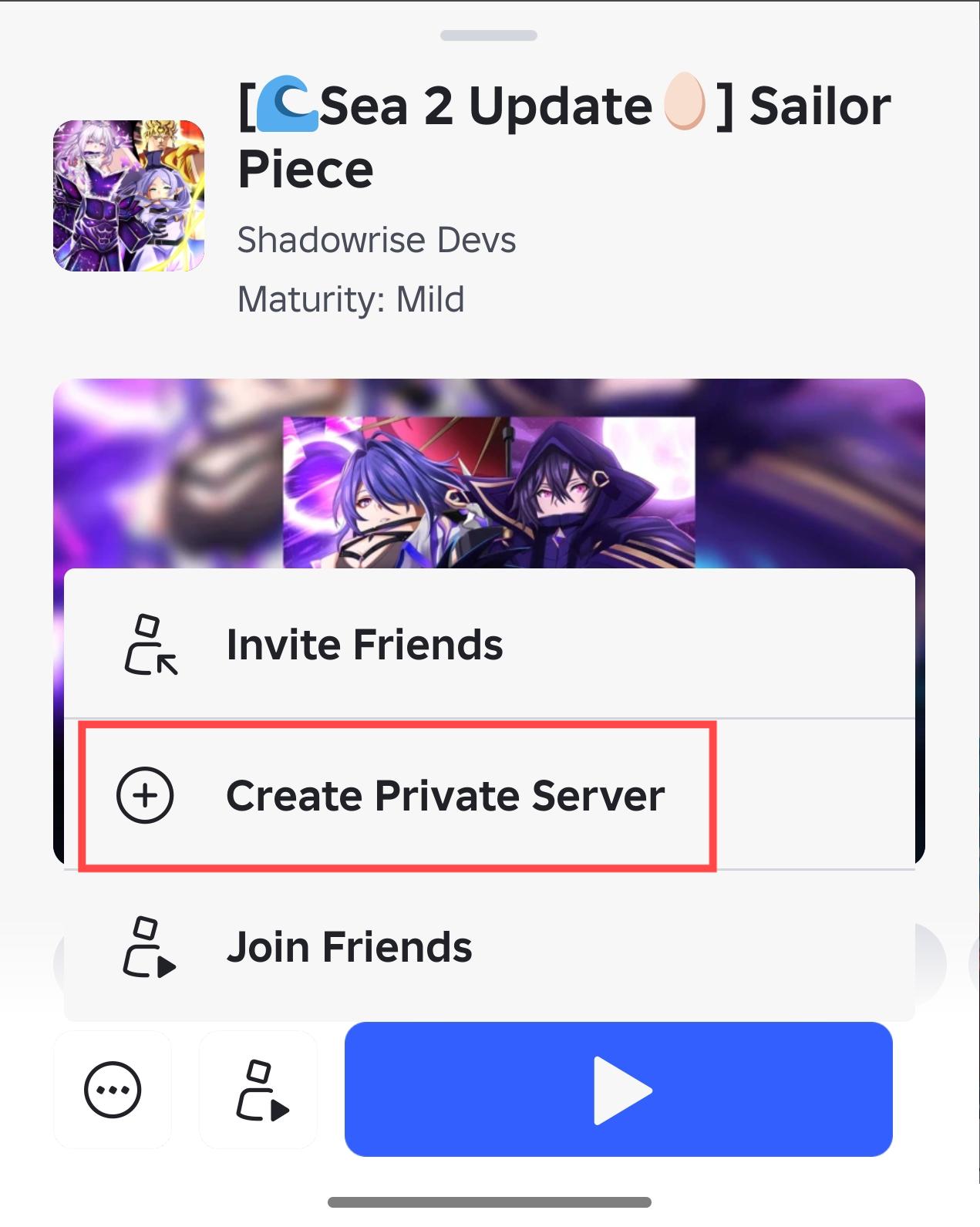
Open Roblox and enter a Private Server for “Sailor Piece” to prevent other players from interfering with your positioning. After entering the game, turn the graphics to the lowest and turn off VFX to ensure extreme stability for long-term AFK.
Step 3: Precise Positioning and Enable Auto Skill
Walk to the designated edge position on Shinjuku Island. Turn on “Auto Skill” in the game settings and select Quake’s C skill, ensuring the character can simultaneously one-shot monsters on both sides.
Step 4: Configure Clicker and Cloud Hosting
Open the Auto Clicker, set it to single-point mode, set the click interval between 15 and 30 seconds, and place the crosshair on a blank area of the screen. After clicking run, observe for 20 minutes to confirm the positioning hasn’t shifted. Once everything is stable, directly close the UgPhone App and wait for the overflowing loot with peace of mind!
Although Sea 2 brings more fresh gameplay, the Shinjuku fixed-point AFK in Sea 1 remains a very classic route in “Sailor Piece,” highly suitable for long-term resource accumulation. Through the powerful AoE of the Quake fruit, combined with the 24-hour lossless hosting of the UgPhone cloud phone, you can still turn Aura Crate and Cosmetic Crate farming into a continuously producing daily resource line.
👉 Here are two guides to help you learn more about “Sailor Piece” AFK leveling strategies and AFK setup.
👉 If you are ready to advance to Sea 2 but don’t know how to plan your route, please click here to view this advanced guide.
Don’t let the performance of physical devices limit your resource acquisition speed anymore. Download and experience UgPhone now, and start your fully automated crate farming journey!